
Many people spend hours researching office chairs, lumbar support, seat cushions, and desk setups, but overlook one of the most important factors for comfort and spinal health: chair angle.
Even the most expensive ergonomic chair can feel uncomfortable if it’s positioned incorrectly. The angle of your backrest affects spinal alignment, pressure on the lower back, circulation, neck posture, and overall comfort throughout the workday.
So, what’s the best office chair angle?
For most desk work, ergonomic experts generally recommend a backrest angle between 100 and 110 degrees, with the seat slightly reclined rather than perfectly upright. This position reduces spinal compression while still allowing efficient typing, reading, and computer work.
However, the ideal angle depends on what you’re doing, how long you’re sitting, and your individual body mechanics.
This guide explains everything you need to know about office chair angles, including recommended positions for work, gaming, reading, and relieving back pain.
Why Office Chair Angle Matters
Most people assume sitting straight up at a perfect 90-degree angle is ideal.
In reality, research has shown that sitting perfectly upright can place significant pressure on the lumbar discs and spinal structures.
When you recline slightly, your body distributes weight more evenly across the chair, reducing stress on the lower back.
The angle of your office chair affects:
- Spinal alignment
- Lower back pressure
- Neck strain
- Shoulder tension
- Hip positioning
- Blood circulation
- Breathing efficiency
- Long-term sitting comfort
A small adjustment of just 10 to 15 degrees can dramatically improve comfort during long work sessions.
Understanding Office Chair Angles
Before discussing recommendations, it’s important to understand how chair angles are measured.
90-Degree Angle
A 90-degree angle means your torso is completely upright relative to your thighs.
Many people think this is the “correct” posture because it appears straight and professional.
However, maintaining a rigid 90-degree posture for extended periods often causes:
- Increased lumbar disc pressure
- Muscle fatigue
- Reduced movement
- Lower back discomfort
While 90 degrees may work briefly, it’s usually not ideal for all-day sitting.
100-Degree Angle
At approximately 100 degrees, the backrest reclines slightly.
This position:
- Reduces spinal compression
- Supports natural spinal curves
- Maintains productivity
- Encourages better posture
Many ergonomic experts consider this a strong starting point for office work.
110-Degree Angle
A 110-degree recline is often regarded as the sweet spot for prolonged computer use.
Benefits include:
- Reduced pressure on spinal discs
- Less lower back strain
- Improved comfort during long work sessions
- Better weight distribution
Many premium ergonomic chairs are designed around this range.
120-Degree Angle and Beyond
At 120 degrees or greater, the chair enters a more relaxed position.
This angle works well for:
- Reading
- Video calls
- Thinking tasks
- Watching presentations
- Taking short breaks
However, typing efficiency may decrease because your arms must reach farther forward.
The Best Office Chair Angle for Most People
For typical desk work, the best office chair angle is usually between:
100 to 110 degrees
This range provides the best balance between:
- Productivity
- Ergonomic support
- Comfort
- Lower back protection
When sitting in this range:
- Feet remain flat on the floor
- Knees stay near 90 degrees
- Lumbar support maintains contact with the lower back
- Shoulders remain relaxed
- Head stays aligned over the shoulders
Most people find they can work significantly longer without discomfort when using a slight recline rather than sitting perfectly upright.
Best Chair Angle for Typing
Typing requires precision and arm support.
For keyboard-intensive tasks, aim for:
100 to 105 degrees
This allows:
- Easy reach to the keyboard
- Proper wrist positioning
- Reduced shoulder tension
- Better spinal support
If you recline too far while typing, you may begin reaching forward, which can create neck and shoulder strain.
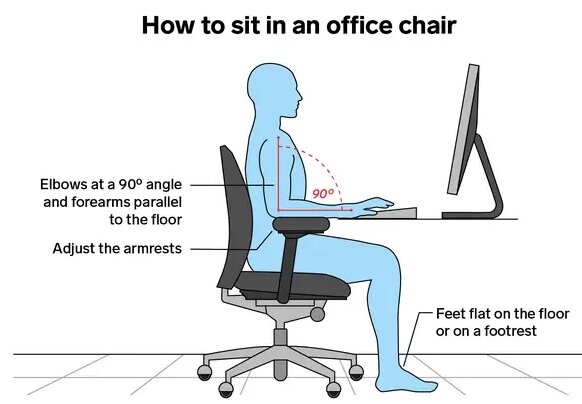
Ideal Typing Setup
Combine your chair angle with:
- Elbows at roughly 90 degrees
- Wrists neutral
- Monitor at eye level
- Feet flat on the floor
These adjustments work together to improve ergonomics.
Best Chair Angle for Lower Back Pain
People experiencing lower back pain often benefit from more recline than they expect.
Research consistently shows that a slight reclined posture reduces pressure on lumbar discs compared to sitting upright.
A good range is:
110 to 120 degrees
This position:
- Reduces lumbar compression
- Allows back muscles to relax
- Improves weight distribution
- Supports the natural curve of the spine
Use Lumbar Support Correctly
Even the ideal angle won’t help if lumbar support is positioned incorrectly.
The lumbar cushion should:
- Sit directly in the curve of your lower back
- Fill the natural gap between your back and chair
- Prevent slouching
When combined with a 110-degree recline, proper lumbar support can significantly improve comfort.
Best Chair Angle for Neck Pain
Neck pain often results from leaning forward rather than the chair itself.
For neck comfort:
100 to 110 degrees
Also ensure:
- Monitor height is correct
- Screen is directly in front of you
- Shoulders remain relaxed
- Headrest supports the head when reclining
A properly positioned monitor is just as important as chair angle when addressing neck discomfort.
Best Chair Angle for Gaming
Gaming sessions frequently last several hours.
Many gamers alternate between active and passive positions throughout a session.
Competitive Gaming
For competitive gaming:
100 to 105 degrees
Benefits include:
- Faster reaction times
- Better mouse control
- Easier keyboard access
- Improved focus
Casual Gaming
For casual gaming:
110 to 120 degrees
Benefits include:
- Increased comfort
- Reduced fatigue
- Better relaxation
Many gaming chairs include tilt-lock mechanisms specifically for this reason.
Best Chair Angle for Reading
Reading doesn’t require constant keyboard interaction.
Because of this, you can comfortably recline farther.
Recommended range:
110 to 130 degrees
This position:
- Relaxes the lower back
- Reduces shoulder tension
- Encourages comfortable reading posture
Many people naturally adopt this angle when reviewing documents or reading on a tablet.
Best Chair Angle for Watching Videos
When watching presentations, training videos, or webinars, productivity is less dependent on keyboard access.
A comfortable range is:
115 to 130 degrees
This allows:
- Reduced muscle tension
- Better relaxation
- Less spinal loading
If your chair includes a headrest, this position becomes even more comfortable.
Why Sitting Perfectly Upright Isn’t Ideal
For decades, people were told to sit at exactly 90 degrees.
Modern ergonomic research paints a different picture.
The spine naturally forms an S-shaped curve.
When sitting perfectly upright:
- Lumbar pressure increases
- Muscles work harder
- Fatigue develops faster
- Movement becomes restricted
A slight recline better supports the body’s natural mechanics.
The goal isn’t rigid posture.
The goal is supported posture.
Dynamic Sitting Is Better Than Static Sitting
One of the biggest ergonomic mistakes is staying in a single position all day.
Even the perfect chair angle becomes problematic if maintained for hours without movement.
Why Movement Matters
Movement helps:
- Improve circulation
- Reduce stiffness
- Relieve pressure points
- Prevent muscle fatigue
Your body is designed to move.
No chair angle can completely compensate for prolonged immobility.
Recommended Angle Changes Throughout the Day
Many ergonomists recommend varying posture during work sessions.
For example:
- Typing: 100–105 degrees
- Meetings: 105–110 degrees
- Reading: 110–120 degrees
- Breaks: 120–130 degrees
These adjustments help distribute pressure across different areas of the body.
How to Adjust Your Office Chair Properly
Chair angle works best when combined with proper chair setup.
Step 1: Set Seat Height
Adjust seat height so:
- Feet rest flat on the floor
- Knees remain near 90 degrees
- Thighs are parallel to the floor
Step 2: Position Lumbar Support
Move lumbar support until it fits naturally into the curve of your lower back.
Avoid placing it too high or too low.
Step 3: Recline the Backrest
Start at approximately 100 degrees.
Gradually recline until you find a comfortable position that still allows efficient work.
Step 4: Adjust Armrests
Armrests should support the arms without lifting the shoulders.
Your shoulders should remain relaxed.
Step 5: Position the Monitor
Place the monitor:
- Directly in front of you
- About an arm’s length away
- With the top of the screen near eye level
Poor monitor placement often causes posture problems that people mistakenly blame on their chair.
Common Chair Angle Mistakes
Sitting Too Upright
Many users lock their chair at 90 degrees.
This often increases lower back pressure and discomfort.
Reclining Too Far While Working
Excessive recline can force the head and arms forward.
This may create neck and shoulder strain.
Ignoring Lumbar Support
Even the best angle won’t compensate for poor lumbar support.
Locking the Chair All Day
Modern ergonomic chairs are designed to move.
Using tilt tension instead of tilt lock often promotes healthier sitting.
Leaning Forward Constantly
Many workers unknowingly sit on the edge of their seat and lean toward the monitor.
This posture eliminates the benefits of lumbar support and proper recline.
Signs Your Chair Angle Needs Adjustment
Your current angle may be incorrect if you experience:
- Lower back pain
- Neck stiffness
- Shoulder tension
- Frequent slouching
- Hip discomfort
- Leg numbness
- Constant shifting in your seat
Small adjustments can often solve these problems quickly.
Experiment within the 100-to-120-degree range to find the most comfortable position.
Office Chair Angle FAQ
Is 90 degrees the best office chair angle?
No. While 90 degrees was traditionally recommended, most ergonomic experts now favor a slight recline between 100 and 110 degrees for prolonged sitting.
Is 110 degrees too far back?
Not at all. Many ergonomic studies suggest that 110 degrees reduces spinal pressure compared to sitting perfectly upright.
What’s the best angle for lower back pain?
Most people with lower back discomfort benefit from a range between 110 and 120 degrees combined with proper lumbar support.
Should I lock my office chair upright?
Generally, no. Allowing slight movement and recline encourages healthier posture and reduces fatigue.
What angle do ergonomic chairs use?
Most high-quality ergonomic chairs are designed to support positions ranging from approximately 90 to 135 degrees, with 100 to 110 degrees being the most commonly recommended working position.
Final Thoughts
If you’re wondering what’s the best office chair angle, the answer for most people is simple: aim for a slight recline of approximately 100 to 110 degrees.
This range provides an excellent balance of productivity, comfort, spinal support, and long-term ergonomics. People dealing with lower back pain may benefit from reclining slightly farther, while typing-intensive tasks may require a position closer to 100 degrees.
The most important takeaway is that there isn’t a single perfect angle for every situation. The healthiest approach combines proper chair setup, lumbar support, monitor positioning, and regular movement throughout the day.
Instead of forcing yourself into a rigid 90-degree posture, allow your chair to support your body’s natural alignment. A small adjustment in recline can significantly improve comfort, reduce fatigue, and make long hours at a desk much easier on your spine.