
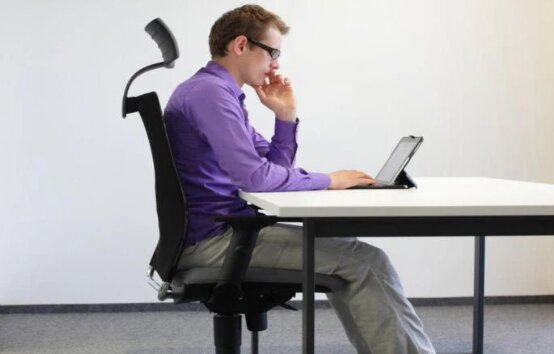
Poor posture doesn’t happen overnight. It develops after months or even years of sitting in a chair that fails to support your spine, shoulders, and hips properly.
Whether you work from home, spend long hours in the office, or simply sit at a desk for several hours each day, the right office chair can make a significant difference. A well-designed ergonomic chair encourages a neutral sitting position, reduces strain on your lower back, and helps minimize neck and shoulder fatigue.
While improving posture also depends on your desk setup and sitting habits, investing in a supportive office chair is one of the best places to start.
After comparing lumbar support, adjustability, seat comfort, headrest design, build quality, weight capacity, recline features, and overall ergonomic performance, one chair stood above the rest.
Our Top Recommendation: Marsail Ergonomic Office Chair
Why We Recommend It
The Marsail Ergonomic Office Chair offers one of the best combinations of ergonomic adjustability, comfort, and value currently available.
Its adjustable lumbar support moves both vertically and horizontally, allowing users to customize support based on their height and spinal curvature. Combined with its breathable mesh backrest, adjustable headrest, 3D armrests, and supportive high-density foam seat, it delivers excellent all-day comfort while encouraging healthier posture.
Unlike many budget office chairs that include fixed lumbar support, the Marsail adapts to your body instead of forcing your body to adapt to the chair.
For most people looking to improve posture while working from home or in the office, it’s our top overall recommendation.
Best Office Chairs for Posture: Our Top Picks
- Marsail Ergonomic Office Chair — Best Overall
- TRALT Ergonomic Office Chair — Best Value
- CAPOT Ergonomic Mesh Office Chair — Best for Long Sitting Sessions
- ProtoArc EC200 — Best Adjustable Seat Depth
- SmartSeat Ergonomic Office Chair — Best for Reclining Comfort
- SIHOO M18 Ergonomic Office Chair — Best Budget Ergonomic Chair
- Clouvou Ergonomic Office Chair — Best Budget Alternative
1. Marsail Ergonomic Office Chair – Best Overall Office Chair for Posture
Pros
✓ Excellent adjustable lumbar support
✓ Fully adjustable headrest
✓ Comfortable high-density foam cushion
✓ Breathable mesh back
✓ 3D adjustable armrests
✓ Smooth reclining mechanism
✓ Supports up to 330 lbs
Cons
✕ Seat depth isn’t adjustable
✕ Headrest could offer slightly more extension for very tall users
Specifications
| Feature | Specification |
|---|---|
| Weight Capacity | 330 lbs |
| Lumbar Support | Adjustable (Height & Depth) |
| Headrest | 2D Adjustable |
| Armrests | 3D Adjustable |
| Recline | 90°–120° |
| Seat Material | High-density foam |
| Back Material | Breathable mesh |
| Wheels | Rolling casters |
If your primary goal is improving posture during long workdays, the Marsail Ergonomic Office Chair is one of the strongest options available.
Its biggest strength is the adjustable lumbar support. Instead of relying on a fixed cushion that may or may not line up with your lower back, the lumbar mechanism moves vertically and horizontally to better match your spine. This allows the chair to support the natural S-curve of your back, helping reduce slouching over time.
The breathable mesh backrest also deserves praise. It conforms gently to your back while allowing airflow to circulate freely, making it more comfortable during extended sitting sessions than many padded chairs.
Comfort doesn’t stop there. The 3.14-inch high-density foam seat provides a balanced level of cushioning—soft enough for comfort but supportive enough to discourage poor sitting habits caused by overly plush cushions.
Another highlight is the 3D armrests. Being able to move them forward, backward, and side to side makes it much easier to position your elbows at roughly 90 degrees, reducing shoulder tension while typing.
The reclining backrest adjusts from 90° to 120°, giving you flexibility to sit upright while working and lean back during breaks without sacrificing support.
Although it lacks adjustable seat depth, the overall ergonomic package is difficult to beat at this price point.
Bottom Line
If you’re looking for the best office chair for posture without spending premium ergonomic chair money, the Marsail Ergonomic Office Chair offers exceptional support, adjustability, and long-term comfort.
2. TRALT Ergonomic Office Chair – Best Value Office Chair for Posture
Pros
✓ Outstanding lumbar support for the price
✓ High-resilience molded foam seat
✓ Breathable mesh back
✓ Reinforced metal-core base
✓ Five-year warranty
✓ Excellent overall value
Cons
✕ Armrests offer fewer adjustments than premium models
✕ Recline controls are fairly basic
Specifications
| Feature | Specification |
|---|---|
| Weight Capacity | 330 lbs |
| Lumbar Support | Adjustable |
| Seat Material | High-resilience molded foam |
| Back Material | Mesh |
| Warranty | 5 Years |
| Certification | BIFMA |
| Seat Height | 17.7″–21.7″ |
Many affordable office chairs advertise ergonomic support, but few include genuinely adjustable lumbar support.
The TRALT Ergonomic Office Chair is one of the exceptions.
Its lumbar system adjusts to better match the natural curve of your lower back, helping reduce pressure during long periods of sitting. Unlike fixed plastic lumbar pieces commonly found in budget chairs, TRALT’s mechanism provides a more personalized fit.
The molded foam seat is another standout feature. High-resilience foam maintains its shape far better than conventional cushions, reducing the “bottoming out” feeling that often develops after months of use.
The breathable mesh back helps regulate temperature throughout the workday, while the reinforced base adds confidence in long-term durability.
The seat dimensions are thoughtfully designed to support healthy posture. The depth leaves enough space behind the knees to promote proper circulation while still providing adequate thigh support.
For buyers who want ergonomic features without paying several hundred dollars, TRALT delivers remarkable value.
Bottom Line
The TRALT Ergonomic Office Chair offers one of the best price-to-performance ratios for improving posture, making it an excellent choice for budget-conscious buyers.
3. CAPOT Ergonomic Mesh Office Chair – Best Office Chair for Long Sitting Sessions
Pros
✓ Exceptional lumbar micro-adjustments
✓ Supports up to 400 lbs
✓ Large breathable mesh seat
✓ Flip-up 4D armrests
✓ Multiple recline lock positions
✓ Five-year warranty
Cons
✕ Takes slightly longer to assemble
✕ Larger footprint than some competitors
Specifications
| Feature | Specification |
|---|---|
| Weight Capacity | 400 lbs |
| Lumbar Support | 8-Level Micro Adjustment |
| Armrests | 4D Flip-Up |
| Recline | 90°, 110°, 125° |
| Headrest | 3D Adjustable |
| Seat Material | Aerovith Mesh |
| Warranty | 5 Years |
For people who spend eight or more hours at a desk, long-term comfort becomes just as important as posture support.
That’s where the CAPOT Ergonomic Mesh Office Chair excels.
Its lumbar support system offers eight micro-adjustment levels, allowing users to fine-tune support until it aligns comfortably with the lower back. This level of precision is uncommon in chairs within this price range.
The oversized Aerovith mesh seat also sets it apart. Unlike traditional foam cushions that trap heat, the mesh promotes continuous airflow while maintaining consistent support across the seating surface.
The adjustable headrest complements the lumbar system by supporting the neck during both upright work and reclining breaks.
One of my favorite features is the multiple recline lock positions. Being able to switch between focused work at 90°, relaxed reading at 110°, or deeper recline at 125° encourages movement throughout the day rather than remaining in one static position.
With a 400-pound weight capacity and durable steel components, the CAPOT is also one of the most robust chairs in this roundup.
Bottom Line
If you regularly spend full workdays at your desk, the CAPOT Ergonomic Mesh Office Chair combines outstanding lumbar support, cooling comfort, and heavy-duty durability, making it one of the best office chairs for posture and extended sitting.
4. ProtoArc EC200 – Best Office Chair for Customized Posture Support
Pros
✓ Adjustable seat depth for different leg lengths
✓ Highly adjustable lumbar support
✓ Excellent 3D headrest
✓ Four-position recline
✓ Supportive high-density foam cushion
✓ Great for remote workers
Cons
✕ Lower weight capacity than some competitors
✕ Recommended height range is slightly narrower
Specifications
| Feature | Specification |
|---|---|
| Weight Capacity | 220 lbs |
| Recommended Height | 5’4″–6’0″ |
| Seat Depth | Adjustable (5 Positions) |
| Lumbar Support | Height & Depth Adjustable |
| Headrest | 3D Adjustable |
| Recline | 90°, 105°, 120°, 130° |
| Cushion | High-Density Foam |
One of the most overlooked aspects of good posture is proper seat depth.
If the seat is too short, your thighs receive inadequate support. If it’s too deep, the edge of the seat presses into the backs of your knees, restricting circulation and encouraging slouching.
The ProtoArc EC200 addresses this problem with a five-position sliding seat, allowing users to fine-tune the chair based on their leg length. This is a feature that’s still relatively uncommon in this price range and can make a noticeable difference in long-term comfort.
The lumbar support is equally impressive. It adjusts vertically and in depth, helping fill the gap between your lower back and the chair so your spine remains in a more natural position throughout the day.
Another standout feature is the oversized 3D headrest. It adjusts in multiple directions and provides reliable support without pushing your head too far forward—a common issue on lower-quality ergonomic chairs.
The chair also includes four recline positions, making it easy to shift between focused work, reading documents, attending meetings, or relaxing during breaks.
The high-density foam seat deserves recognition as well. Rather than feeling overly soft at first and flattening over time, it maintains a firmer profile that better supports healthy posture over long work sessions.
Although it’s designed for users up to 220 pounds, those within its recommended size range will likely appreciate its tailored ergonomic fit.
Bottom Line
If achieving a personalized fit is your priority, especially when it comes to seat depth and spinal alignment, the ProtoArc EC200 is one of the strongest ergonomic office chairs available in its class.
5. SmartSeat Ergonomic Office Chair – Best Reclining Office Chair for Posture
Pros
✓ Reclines up to 135°
✓ Breathable mesh back
✓ Quiet rolling wheels
✓ Supports up to 330 lbs
✓ Comfortable adjustable headrest
✓ Flip-up armrests
Cons
✕ Lumbar support offers fewer adjustments than some competitors
✕ Seat depth is fixed
Specifications
| Feature | Specification |
|---|---|
| Weight Capacity | 330 lbs |
| Recline | Up to 135° |
| Headrest | 3D Adjustable |
| Armrests | 2D Flip-Up |
| Back Material | Breathable Mesh |
| Wheels | Ultra-Quiet Blade Wheels |
For many people, maintaining good posture isn’t just about sitting upright—it’s also about changing positions throughout the day.
The SmartSeat Ergonomic Office Chair encourages this with a generous 135-degree reclining range that allows your spine to relax during breaks while still providing supportive contact.
Its breathable mesh back helps reduce heat buildup during extended work sessions, making it especially appealing for warmer environments or users who tend to sit for long periods.
The chair’s integrated lumbar support works together with the adjustable headrest to promote a more neutral sitting position, helping reduce strain on both the lower back and neck.
Another feature worth mentioning is the ultra-quiet caster wheels. While they don’t directly affect posture, they contribute to a smoother and less distracting workspace, particularly in shared offices.
The flip-up armrests provide flexibility as well, allowing you to move closer to your desk or tuck the chair underneath when not in use.
Although the lumbar support isn’t quite as adjustable as our top picks, the overall ergonomic package still delivers excellent comfort for everyday office work.
Bottom Line
The SmartSeat Ergonomic Office Chair is an excellent option for users who frequently alternate between focused work and relaxing breaks while still maintaining good ergonomic support.
6. SIHOO M18 Ergonomic Office Chair – Best Budget Ergonomic Office Chair for Posture
Pros
✓ Excellent value
✓ Adjustable lumbar support
✓ Adjustable headrest
✓ Wide comfortable seat
✓ Breathable mesh back
✓ Proven ergonomic design
Cons
✕ Armrests only offer 2D adjustment
✕ Recline options are more limited
Specifications
| Feature | Specification |
|---|---|
| Weight Capacity | 330 lbs |
| Recommended Height | 5’6″–6’2″ |
| Lumbar Support | Adjustable |
| Headrest | Adjustable |
| Armrests | 2D Adjustable |
| Back Material | Mesh |
| Certification | BIFMA Tested |
The SIHOO M18 has built a strong reputation among buyers looking for an ergonomic chair without spending a premium.
Its design focuses on supporting the four key contact points that influence posture: the head, back, hips, and arms.
The adjustable lumbar support helps encourage the natural inward curve of the lower spine, reducing the tendency to round your back while working.
The adjustable headrest is another welcome addition, especially for taller users who often struggle to find affordable chairs with adequate neck support.
The breathable mesh back helps prevent overheating during long work sessions, while the generously sized seat cushion distributes pressure comfortably across the hips and thighs.
Although the armrests aren’t as adjustable as higher-end models, they still provide useful support while typing and using a mouse.
Considering its price, the SIHOO M18 offers an impressive combination of ergonomic features, making it one of the best entry-level chairs for improving posture.
Bottom Line
If you’re shopping on a tighter budget, the SIHOO M18 delivers many of the ergonomic features found on more expensive office chairs at a much more accessible price.
7. Clouvou Ergonomic Office Chair – Best Affordable Alternative
Pros
✓ Budget-friendly pricing
✓ Breathable mesh construction
✓ Adjustable headrest
✓ Comfortable seat cushioning
✓ Smooth rolling casters
✓ Easy assembly
Cons
✕ Fewer adjustment options than premium models
✕ Basic lumbar support
Specifications
| Feature | Specification |
|---|---|
| Weight Capacity | 300–330 lbs (model dependent) |
| Back Material | Mesh |
| Headrest | Adjustable |
| Recline | Adjustable |
| Armrests | Flip-Up |
| Best For | Budget-conscious buyers |
For buyers looking to spend as little as possible while still upgrading from a basic office chair, the Clouvou Ergonomic Office Chair is a solid entry-level option.
It doesn’t offer the extensive customization found on premium ergonomic chairs, but it covers the essentials well. The breathable mesh back promotes airflow, the adjustable headrest provides additional neck support, and the cushioned seat is comfortable enough for several hours of daily use.
Its flip-up armrests make it easier to slide the chair under a desk, which is especially helpful in smaller home offices where space is limited.
The lumbar support is more basic than what you’ll find on models like the Marsail or CAPOT, but it still encourages a healthier sitting position compared to standard task chairs that lack dedicated lower-back support altogether.
Assembly is straightforward, and the chair rolls smoothly across most flooring surfaces thanks to its durable caster wheels.
For occasional office work, studying, or anyone furnishing a workspace on a tight budget, the Clouvou offers respectable ergonomic performance without a premium price tag.
Bottom Line
The Clouvou Ergonomic Office Chair is a practical budget-friendly choice for users who want better posture support than a traditional office chair while keeping costs low.
Office Chair Comparison Table
| Chair | Lumbar Support | Headrest | Armrests | Recline | Weight Capacity | Best For |
|---|---|---|---|---|---|---|
| Marsail Ergonomic Office Chair | Height & Depth Adjustable | 2D | 3D | 90°–120° | 330 lbs | Best Overall |
| TRALT Ergonomic Office Chair | Adjustable | Adjustable | Fixed/Basic | Adjustable | 330 lbs | Best Value |
| CAPOT Ergonomic Mesh Office Chair | 8-Level Micro Adjustment | 3D | 4D Flip-Up | 90°/110°/125° | 400 lbs | Long Sitting Sessions |
| ProtoArc EC200 | Height & Depth Adjustable | 3D | Adjustable | 90°–130° | 220 lbs | Best Seat Depth Adjustment |
| SmartSeat Ergonomic Office Chair | Integrated | 3D | 2D Flip-Up | Up to 135° | 330 lbs | Best Reclining Comfort |
| SIHOO M18 | Adjustable | Adjustable | 2D | Tilt Lock | 330 lbs | Best Budget Pick |
| Clouvou Ergonomic Office Chair | Basic Lumbar Support | Adjustable | Flip-Up | Adjustable | 300–330 lbs | Affordable Alternative |
Why Good Posture Starts With the Right Chair
A quality ergonomic office chair won’t magically fix years of poor posture, but it can make maintaining healthy sitting habits much easier.
The best office chairs support your body in several key areas simultaneously:
- Lower back
- Upper back
- Neck
- Hips
- Arms
- Thighs
When each of these areas is properly supported, your muscles don’t have to work as hard to keep you upright.
Instead of constantly slouching forward or leaning to one side, your spine remains closer to its natural S-shaped curve.
This reduces fatigue while helping you remain comfortable throughout long work sessions.
What to Look for in an Office Chair for Posture
Adjustable Lumbar Support
Lumbar support is arguably the single most important ergonomic feature.
Your lower back naturally curves inward. A chair should fill this gap rather than allowing your spine to flatten or round forward.
Ideally, choose a chair with adjustable lumbar support so you can fine-tune its position based on your height.
Adjustable Seat Height
Your feet should rest flat on the floor with your knees bent at approximately 90 degrees.
If your chair is too high or too low, it can place unnecessary strain on your hips, knees, and lower back.
Seat Depth
Seat depth is one of the most overlooked ergonomic features.
A seat that’s too deep pushes against the backs of your knees.
One that’s too shallow leaves your thighs unsupported.
Ideally, there should be about two to four finger widths of space between the seat edge and the back of your knees.
Breathable Backrest
Mesh backrests have become increasingly popular for good reason.
They:
- Improve airflow
- Reduce heat buildup
- Conform to your back
- Encourage better posture
For people who spend eight or more hours sitting, breathable mesh often feels significantly more comfortable than leather or thick foam.
Adjustable Armrests
Armrests should support your elbows without forcing your shoulders upward.
Poorly positioned armrests often contribute to:
- Shoulder pain
- Neck stiffness
- Wrist fatigue
The more adjustable the armrests, the easier it is to achieve a neutral typing position.
Headrest
A headrest isn’t essential for everyone.
However, if you frequently recline or experience neck discomfort, an adjustable headrest can reduce strain during breaks.
Recline Function
Contrary to popular belief, sitting perfectly upright all day isn’t ideal.
Changing positions throughout the day reduces pressure on your spine.
Look for chairs that lock into multiple recline positions rather than remaining fixed.
Common Mistakes That Hurt Your Posture
Even the best office chair can’t compensate for poor sitting habits.
Here are some common mistakes to avoid.
Sitting Too Low
When your knees rise above your hips, your pelvis tilts backward.
This encourages slouching and places additional stress on your lower back.
Leaning Forward
Many people instinctively lean toward their monitor.
Instead, move your monitor closer so your back remains against the chair.
Ignoring Armrests
Unsupported arms increase tension throughout your shoulders and neck.
Adjust your armrests so your elbows remain close to a 90-degree angle.
Sitting for Hours Without Moving
No ergonomic chair can replace movement.
Aim to stand up every 30 to 60 minutes, stretch briefly, or take a short walk around your workspace.
How We Chose the Best Office Chairs for Posture
When evaluating each chair, we focused on the features that have the greatest impact on long-term comfort and spinal alignment.
Our selection criteria included:
- Lumbar support quality
- Overall adjustability
- Seat comfort
- Headrest design
- Armrest flexibility
- Breathability
- Recline functionality
- Build quality
- Weight capacity
- Ease of assembly
- Value for money
- User feedback and long-term durability
Rather than simply choosing the most expensive models, we prioritized chairs that deliver meaningful ergonomic benefits across a range of budgets.
Frequently Asked Questions
What is the best office chair for posture?
The Marsail Ergonomic Office Chair is our top overall recommendation. It combines highly adjustable lumbar support, breathable mesh, 3D armrests, and a supportive seat cushion to promote healthy spinal alignment during long work sessions.
Can an office chair actually improve posture?
Yes—but only when paired with good sitting habits.
An ergonomic office chair encourages proper spinal alignment by supporting your lower back, shoulders, and hips. Over time, this can help reduce slouching and improve overall sitting posture.
Is mesh or leather better for posture?
Neither material directly improves posture, but mesh is often the better choice for long hours because it promotes airflow and conforms more naturally to your back.
Is lumbar support really necessary?
Absolutely.
Proper lumbar support helps maintain the natural curve of your lower spine and reduces the tendency to slouch.
Are expensive office chairs worth it?
Not always.
Many mid-range ergonomic chairs now offer adjustable lumbar support, headrests, and quality mesh construction at significantly lower prices than premium brands.
How long should I sit before taking a break?
Experts generally recommend standing or walking for a few minutes every 30 to 60 minutes.
Changing positions throughout the day reduces fatigue and supports better posture.
What chair height is best?
Your feet should rest flat on the floor while your knees remain close to a 90-degree angle.
Should my office chair have a headrest?
If you spend long hours working or frequently recline during breaks, an adjustable headrest can help reduce neck strain.
Is a gaming chair good for posture?
Some gaming chairs offer decent ergonomic features, but many prioritize appearance over adjustability. A quality ergonomic office chair typically provides better lumbar support and promotes healthier posture for extended desk work.
What is the ideal sitting position?
Aim to:
- Keep your back against the backrest.
- Maintain your spine’s natural curve.
- Keep your feet flat on the floor.
- Position your knees at roughly 90 degrees.
- Relax your shoulders.
- Keep your monitor at eye level.
Who Should Buy Each Chair?
Choose the Marsail Ergonomic Office Chair if:
- You want the best overall balance of comfort and adjustability.
- You work from home full-time.
- You want customizable lumbar support.
- You spend 6–10 hours at a desk each day.
Choose the TRALT Ergonomic Office Chair if:
- You’re shopping on a budget.
- You still want adjustable lumbar support.
- You value long-term seat comfort.
- You want excellent value for money.
Choose the CAPOT Ergonomic Mesh Office Chair if:
- You routinely sit for eight hours or more.
- You need higher weight capacity.
- You want highly adjustable lumbar support.
- You prefer a larger seat.
Choose the ProtoArc EC200 if:
- You’re between 5’4″ and 6’0″.
- Adjustable seat depth is important to you.
- You want a tailored ergonomic fit.
- You work long hours from home.
Choose the SmartSeat Ergonomic Office Chair if:
- You like to recline during breaks.
- You want a quiet office chair.
- You value comfort and airflow.
Choose the SIHOO M18 if:
- You want a trusted ergonomic chair at an affordable price.
- You’re buying your first ergonomic office chair.
- You need reliable everyday support.
Choose the Clouvou Ergonomic Office Chair if:
- You’re furnishing a home office on a tight budget.
- You only need occasional daily use.
- You want basic ergonomic features without overspending.
Final Verdict
Choosing the best office chair for posture comes down to finding a chair that supports your body—not forcing your body to adapt to the chair.
After comparing lumbar support, adjustability, comfort, recline options, and overall ergonomic performance, the Marsail Ergonomic Office Chair earns our top recommendation. Its adjustable lumbar support, breathable mesh back, 3D armrests, and comfortable high-density foam seat make it an excellent all-around choice for promoting healthier posture throughout the workday.
The TRALT Ergonomic Office Chair offers exceptional value for buyers who want ergonomic features without a premium price, while the CAPOT Ergonomic Mesh Office Chair stands out for extended sitting thanks to its highly adjustable lumbar support and generous weight capacity.
If a customized fit is your priority, the ProtoArc EC200 excels with its adjustable seat depth and refined ergonomic adjustments. Those who prefer to recline and change positions frequently will appreciate the SmartSeat Ergonomic Office Chair, while the SIHOO M18 remains one of the best entry-level ergonomic chairs available. For budget-conscious shoppers, the Clouvou Ergonomic Office Chair provides a practical step up from standard office chairs without a significant investment.
Ultimately, the best office chair for posture is the one that fits your body, encourages proper alignment, and keeps you comfortable enough to maintain healthy sitting habits every day.